
Many ICT professionals applying for Australian migration often face delays or rejection in their ACS Skill Assessment due to missing, incorrect, or poorly prepared documents. This can slow down the migration process and may also require applicants to resubmit documents or deal with unfavorable assessment outcomes.
To avoid these issues, it is essential to follow a clear and complete ACS Skill Assessment document checklist. A well-prepared set of documents ensures accuracy, improves approval chances, and helps make the application process smooth and efficient.
In this blog, we will explore the complete ACS skill assessment document checklist, covering all essential documents and the common mistakes to avoid, so you can prepare a strong and successful application with confidence.
Key Takeaways
- The ACS skill assessment document checklist includes identity proof, academic qualifications, employment evidence, and supporting records based on your selected pathway.
- The correct document format of ACS skills assessment typically includes high-quality PDF uploads, with paper-based documents scanned clearly at a minimum of 300 DPI and electronic original documents uploaded in their original issued format without any modification.
- Each document should meet ACS requirements such as file size limits, proper naming, and inclusion of all pages in a single file where applicable.
- The common mistakes you must avoid when preparing an ACS skills assessment include incomplete submissions, inconsistent details across documents, poor-quality scans and missing translations for non-English documents.
- To improve the chances of a smooth and successful ACS Skills Assessment outcome, you must follow a structured checklist and carefully review all documents before submission.
What Documents are Required for ACS Skills Assessment?
The document required for ACS skills assessment includes identity documents, qualification evidence, employment records, payment evidence, and pathway-specific documents. The exact documents depend on the ACS pathway you choose, such as General Skills, Post Australian Study, Recognition of Prior Learning, or Temporary Graduate 485.
Below are the main documents you may need to prepare for your ACS Skills Assessment application.
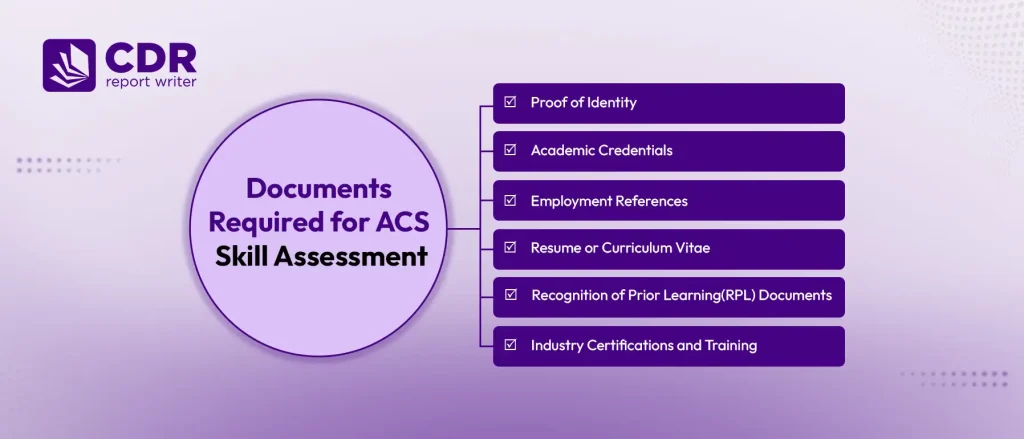
1. Proof of Identity
Applicants must submit valid proof of identity documents when applying for the ACS Skill Assessment through the Australian Computer Society. These documents confirm personal details and ensure all application information is accurate. These may include:
- Passport: Upload the applicant details page only. Do not upload the full passport. Make sure the name used in your ACS application matches the name in your passport.
- Additional Government-Issued Identity Document: Provide one government-issued identity document from your country of birth or current residence. The document should include your photograph.
- Evidence of Change of Name: Submit this only if your current name does not match the name shown on your qualification, employment, or other supporting documents. This usually applies in cases of marriage or other legal name changes.
- Resume or Curriculum Vitae: You may upload your resume or CV in the Personal Details section of your application. This is optional, but it helps present your education, ICT skills, employment history, and project experience clearly.
Note: Documents must be uploaded via the ACS portal using a QR code and a smartphone camera for scanning.
2. Academic Credentials
Academic credentials help ACS review your qualification and ICT or Data Science study background. These documents are important for applicants applying through the General Skills, Post Australian Study, or Temporary Graduate 485 pathways.
- Degree or Award Certificate: Provide a copy of each completed qualification. The certificate should clearly show the title of the award, institution name, and completion date.
- Academic Transcript: Submit your official transcript showing the subjects studied, grades or marks achieved, and grading legend if required.
3. Employment References
Employment references help ACS assess whether your work experience matches your nominated ICT occupation. Your reference letters should clearly explain your role, work period, duties, and employment details.
- Employment Reference Letter: Submit a clear colour scan of your original employment reference letter. It should include your job title, employment dates, work location, weekly hours, salary, and ICT duties.
- Statutory Declaration: If you cannot provide a reference letter with duties, submit a statutory declaration. You also need an employer letter or official email explaining why the reference is unavailable, your employment certificate, and your colleague’s employment certificate showing start and end dates in DD/MM/YYYY format.
- Payment Evidence: Provide clear colour scans of payment evidence. You must submit two types of pay evidence from both the start and end of your employment.
4. Resume or Curriculum Vitae
Submit a current CV or resume that outlines your education, employment history, ICT skills, tools, projects, training, and professional development.
Your CV should match your other documents. For example, your job titles, employment dates, and qualification details should stay consistent with your reference letters, transcripts, and certificates.
5. Recognition of Prior Learning(RPL) Documents
Recognition of Prior Learning(RPL) applies if you need to prove ICT knowledge through work experience and project evidence. This pathway is mainly for applicants who do not have a closely related ICT qualification.
- ACS RPL Form: Complete the required ACS RPL form based on your ICT knowledge and work background.
- Core ICT Knowledge: Explain how you gained ICT knowledge through professional experience, technical work, training, or project involvement.
- Project Report 1: Prepare a detailed project report showing your ICT role, responsibilities, tools used, technical decisions, challenges, and outcomes.
- Project Report 2: Prepare a second project report with a different project context or clearly separate technical experience.
- Professional Currency Evidence: Add evidence that shows recent ICT activity, such as work experience, training, certifications, or professional development.
6. Industry Certifications and Training
You may include ICT-related certifications, professional courses, workshops, or training evidence if they support your nominated occupation or pathway.
These documents can help show your technical knowledge and continued learning. However, do not add unrelated certificates just to increase the number of documents. Only include evidence that supports your ICT profile.
Quick Comparison of ACS Skills Assessment Document Checklists by Pathway
The quick comparison of ACS skills assessment document checklists by pathway helps you identify the main documents required for Temporary Graduate 485, Post Australian Study, General Skills, and RPL. Each pathway has different identity, qualification, employment, payment, or RPL document needs.
The table below provides a list of documents required for ACS skill assessment:
| ACS Pathway | Who Is It For? | Main Document Checklist | Extra Documents to Add If Applicable |
| Temporary Graduate 485 | Applicants who completed an eligible Australian ICT or Data Science qualification and need a skills assessment for the Temporary Graduate visa. | Passport Additional government-issued photo ID Resume or CV, if you want to include it Qualifications evidence | Evidence of change of name, if your documents show different names Certified English translation, if any document is not in English |
| Post Australian Study (PAS) | Applicants who completed an Australian ICT or Data Science qualification and need ACS to assess their qualification with related professional evidence. | Passport details page Government-issued photo ID Australian completion letter or award certificate Australian academic transcript Employment reference letter Payment evidence Resume or CV | Evidence of change of name, if required ACS Professional Year evidence, if used Statutory declaration, if employer reference is unavailable Certified English translation, if required |
| General Skills | ICT professionals who want ACS to assess their qualification and work experience against a nominated ANZSCO occupation | Passport details page Additional government-issued photo ID Degree or award certificate Academic transcript Employment reference letter for each claimed ICT role Payment evidence for claimed employment Resume or CV, if you want to include it | Evidence of change of name Completion letter, if the award certificate is not available Undergraduate qualification documents, if needed Statutory declaration, if employer reference is unavailable Vendor certification evidence, if relevant Certified English translation, if required |
| Recognition of Prior Learning | Applicants who need to prove ICT knowledge through work experience and project evidence instead of a closely related ICT qualification. | Passport details Government-issued photo ID Employment reference letter for each ICT role Payment evidence ACS RPL form 2 RPL Project Reports Professional currency evidence Resume or CV, if you want to include it | Evidence of change of name Statutory declaration, if employer reference is unavailable Industry certification or training evidence, if relevant Certified English translation, if required |
Need Assistance with Your ACS Document Preparation?
Get expert assistance to review your identity proof, qualifications, work experience evidence, and supporting documents to avoid errors before submission.
What Is the Correct Document Format for ACS Skills Assessment?
The correct document format for ACS skills assessment depends on whether your documents are paper-based originals or electronic originals.
1. Paper-Based Original Documents
For paper-based documents, you must upload high-quality colour scans of the original documents with a minimum resolution of 300 DPI. Ensure that every page is clear, fully readable, and all edges are visible without any cropping.
Where a document has multiple pages, combine all pages into a single PDF file for each qualification or record. Each uploaded PDF must not exceed 3MB in size.
2. Electronic Original Documents
Electronic documents must be uploaded in their original digital format as issued by the authority. If a document contains a digital signature, it should be uploaded as a separate file and must not be merged with other documents, as combining files can invalidate the signature.
If the original PDF is password-protected, attach a separate PDF containing a table with the file names and their corresponding passwords. Each uploaded PDF must not exceed 3MB in size.
Want to understand how long your ACS skill assessment takes and plan your migration process better? Read our full guide: ACS Skill Assessment Processing Time.
Common Mistakes to Avoid in ACS Skills Assessment Documents
Common mistakes in ACS Skills Assessment documents you must avoid include uploading the full passport, submitting unclear scans, using different names across documents, missing transcript details, writing generic employment duties, and providing unmatched payment evidence. These mistakes can make your document set unclear and harder to review.
1. Uploading the Full Passport
ACS usually needs only the applicant details page of your passport, not the full passport. Uploading unnecessary passport pages can make your document set messy and harder to review.
2. Using Different Names Across Documents
Your name should match across your passport, qualification certificates, transcripts, employment references, and application form. If your documents show different names due to marriage, spelling differences, or legal changes, add valid name change evidence.
3. Submitting Blurry or Cropped Scans
Poor-quality scans can hide important details such as names, dates, stamps, signatures, and grades. Make sure every document is scanned clearly in colour, with all edges visible. Avoid mobile photos, dark scans, cropped pages, and files where text is hard to read.
4. Writing Generic Employment Duties
Generic duties such as “handled IT tasks” or “managed software systems” do not clearly show your ICT role. Your reference letter should explain your actual technical responsibilities, tools used, systems handled, and contribution to projects. This helps ACS understand how your experience matches your nominated ICT occupation.
5. Providing Unmatched Payment Evidence
Payment evidence should support the same employer, role, and employment period mentioned in your reference letter. If your payslips, bank statements, tax records, or income statements do not match your claimed work period, the evidence may look unclear. Always organize payment records according to each job you claim.
6. Adding Unrelated Certifications
Avoid submitting certificates, workshops, or training records that are not relevant to your nominated ICT occupation. Unrelated documents can distract from your core ICT profile and make your application less focused.
7. Uploading Non-English Documents Without Translation
If any of your supporting documents are not in Australian English, you must submit both the original document and a complete English translation. The translation should be accurate and prepared by an approved translator where required. Submitting documents only in a non-English language may delay the assessment process or lead to requests for additional information.
8. Using Poor File Names
Using unclear file names can make it difficult to identify and review your uploaded documents. Avoid generic names such as scan1.pdf or document-final-new.pdf. Instead, use clear and descriptive file names like Passport.pdf, Academic-Transcript.pdf, Employment-Reference-ABC-Company.pdf, or Payment-Evidence-ABC-Company.pdf.
9. Ignoring Pathway-Specific Requirements
Each ACS assessment pathway has different document requirements. For example, the RPL pathway requires project reports, while other pathways may require qualification, employment, or payment evidence. Always check the requirements for your specific pathway before submitting your application to avoid delays or missing documents.
Frequently Asked Questions
1. Is Work Experience Mandatory for an ACS Skills Assessment?
No, work experience is not mandatory for every ACS assessment pathway. General Skills and RPL pathways usually require relevant work experience.
Post Australian Study may require it when you claim skilled employment. Temporary Graduate 485 assessments generally focus on identity and Australian qualification documents.
2. Can Missing Documents Affect Your ACS Assessment Outcome?
Yes, missing documents can affect your ACS assessment outcome. ACS needs complete evidence to review your identity, qualifications, employment, and pathway requirements.
Missing records can make your application incomplete or prevent ACS from verifying your claims.
3. What if Your Company Has Closed During an ACS Skills Assessment?
Submit a third-party statutory declaration when your former company has closed. The declarant should have directly supervised or worked with you.
Add payslips, bank statements, tax records, or income statements to support the claimed employment.
4. Can You Include Every Job in an ACS Skills Assessment Application?
Include only relevant ICT employment that supports your nominated occupation. Exclude unrelated work, short non-ICT roles, and unverified experience.
Each claimed role should include clear duties, dates, working hours, reference letters, and supporting payment evidence.